

This article is part of the Launchpad Agent Skills series.
When standard isn't enough
Launchpad's Constellation design system covers most UX needs out of the box. But sometimes you need something special: a star rating control, a custom calendar view, a Kanban board or an embedded document viewer.
That's when Custom UX Components come into play.
The challenge? Building these components requires understanding DXCB, Constellation patterns, and Launchpad APIs. That's a lot to learn just to add a rating widget.
This skill gives your AI agent that expertise instantly.
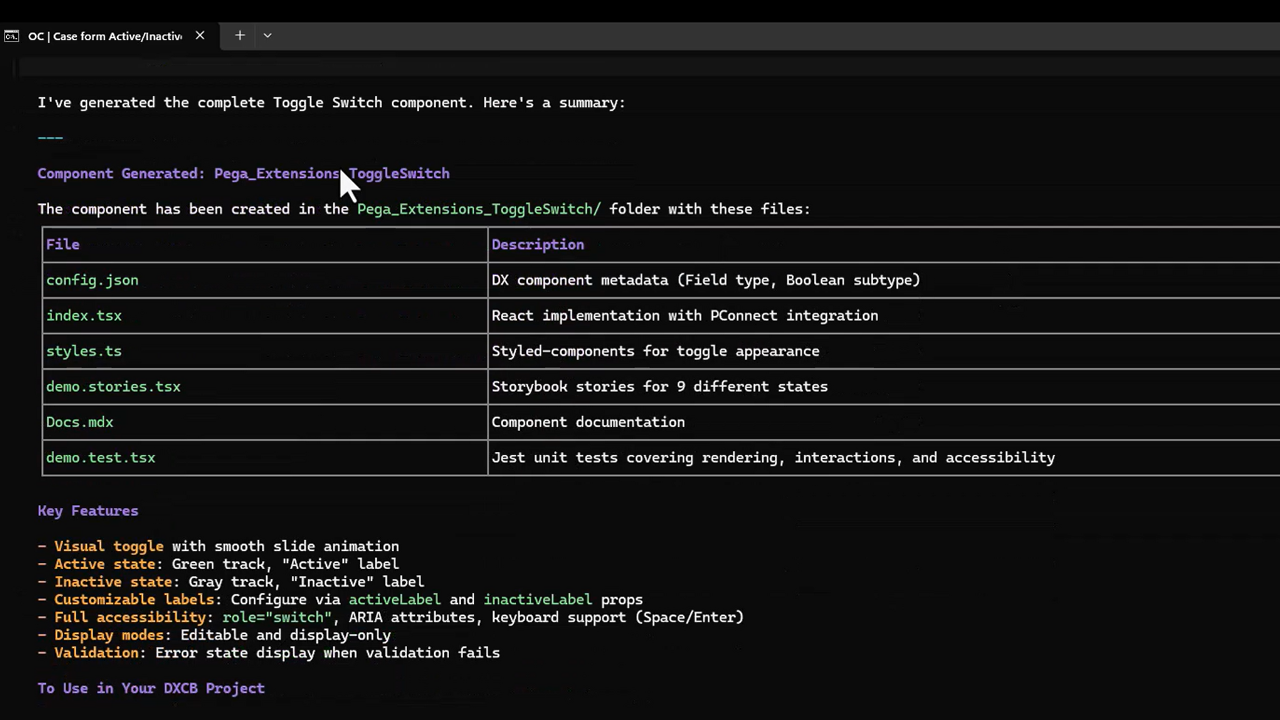
Watch the skill in action: from installing to generating a custom toggle component in under a minute.
What this skill does
Once installed, your AI coding agent becomes a Constellation UX expert that:
- Guides smart decisions – Before writing code, it guides the user to check if an out-of-the-box component or UX Booster already exists
- Asks the right questions – Gathers your requirements through a focused conversation
- Chooses the right approach – Determines whether you need a Field, Widget, or Template
- Generates production-ready code – Creates complete, properly structured components following Launchpad conventions
- Walks you through publishing – Guides you to build, authenticate, and publish your component so it appears in application ready to use
From idea to a working component in your Constellation views, your AI agent handles the entire journey.
When to use this skill
- You need a custom input control (ratings, sliders, signature capture)
- You want a dashboard widget (calendar, charts, KPI tiles)
- You're embedding external content (maps, document viewers, third-party widgets)
- You need a reusable UX pattern across multiple case types
Skip this skill if standard Constellation components meet your needs or a UX Booster already exists at launchpad.io/ux-boosters.
Get started
Install the skill and follow the instructions in the public repository:
github.com/pegasystems/pega-launchpad-agent-skills
Let me give you the exact command to kickstart the skill:
npx skills add https://github.com/pegasystems/pega-launchpad-agent-skills --skill launchpad-ux-custom-components
Once installed, simply describe what you need to your AI agent. It handles the rest: from generating code, guidance on testing, authenticating and publishing generated code to getting your component live in your application.
About the Author
Pratima Edarapalli is a Senior Solutions Architect with a passion for helping Launchpad clients reach their SaaS goals