

This article is part of the Launchpad Agent Skills series.
Every product team eventually hears the same request from customers: "We love what your support team does for us, we just wish the portal felt like part of your product, not a generic ticketing tool."
It's a fair ask. The case management, the SLAs, the routing, the audit trail, Launchpad already does all of that beautifully. What customers want is a front door that feels like their own: branded, intuitive, fast, and tightly woven into the way they already work.
That's exactly the kind of build the Launchpad public DX API Skill is created for. With one skill installed, any modern coding agent, Cursor, Claude Code, Codex, GitHub Copilot, instantly understands how to talk to Launchpad and can scaffold a real, working app on top of it.
This blog tells the story of how I used that skill to bring MySupport to life, a branded, polished ticket management portal in the time it takes to finish lunch.
The vision
I wanted MySupport to feel like a product, not a workflow tool:
- A landing dashboard that greets users with the numbers they care about — tickets created in the last 30 days, tickets created in the last 24 hours, a clean status breakdown, and a quick view of the most recent tickets.
- A Tickets page where users can browse and search everything in one place.
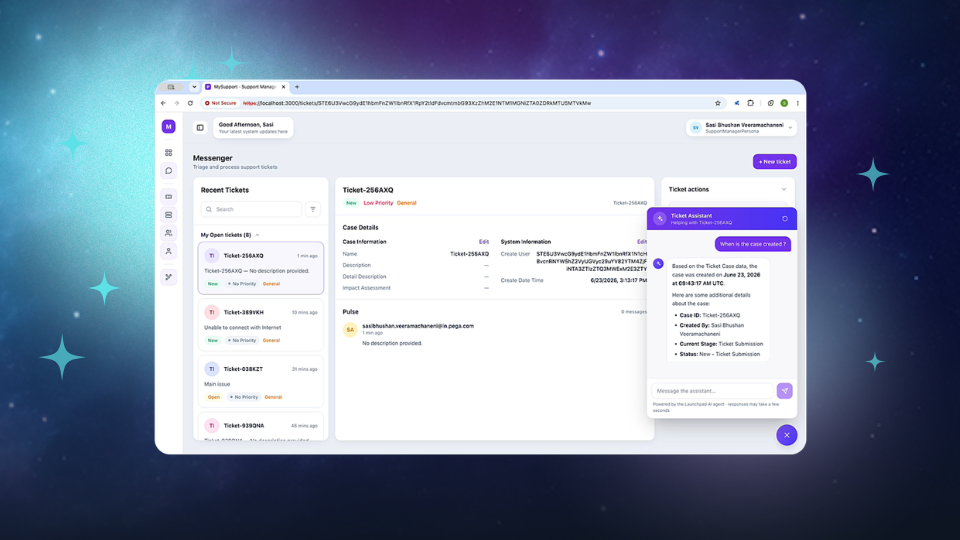
- A Ticket detail page that brings the whole story together — case information, what needs to be done next, supporting details, and the files attached to the ticket.
- The ability for users to act on what's in front of them — complete a task, move the ticket forward, ask for more information — without leaving the portal.
- A conversation with the AI agent assigned to the case, right inside the ticket page.
- A Pulse feed so collaborators can chat, share updates, and keep the team in the loop on the ticket itself.
The only real limit, as I kept reminding myself, was imagination. Everything else, the skill could handle.
What the skill quietly takes care of
The beautiful thing about the public Launchpad Agent Skill is that it teaches your coding agent the entire vocabulary of Launchpad in a single command. From the moment it's installed, your agent already knows how to:
- Create a case — file a new ticket from anywhere in your product, with all the validation and routing Launchpad provides.
- Submit an assignment — let the user complete the task or case wide action in front of them and move the ticket to its next stage.
- Get user information — show the right things to the right person, based on their persona and access.
- Pulse — drop a message onto the ticket's collaboration feed.
- Attachments — List, Upload, Delete attachments on need basis.
None of this requires you, the builder, to learn the underlying mechanics. The skill carries that context for you, every nuance, every rule, every constraint. Your agent simply does the right thing.
Step 1 — Teach your agent
It really is one line:
Shell
npx skills add https://github.com/pegasystems/pega-launchpad-agent-skills --skill launchpad-dx-apis
In a few seconds, your coding agent is now a Launchpad expert.
Step 2 — Let the agent set up the environment
When the skill runs, one of the first things it does is generate an env.example file listing exactly what it needs from your Launchpad environment, the server, the authentication endpoints, the client credentials, the app, the case type. You copy it to env, paste in the values from your Launchpad Administration Setup, and you're done with configuration. No long onboarding doc, no scavenger hunt across tabs.
Step 3 — Describe MySupport, exactly as you imagined it
This is the part that genuinely felt like magic. I described MySupport in plain language to my coding agent, the dashboard, the ticket list, the detail page, the actions, the chat, the Pulse and asked for a React + TypeScript portal with a clean, modern design.
The agent went away and built it.
The landing dashboard
It came alive with the right numbers, refreshing in real time. The "tickets in the last 30 days" and "tickets in the last 24 hours" cards updated as users created new ones. A donut chart broke tickets down by status; a bar chart did the same by priority. A list of the most recent tickets sat below, one click away from the full detail page.
The tickets list
Searchable, sortable, filterable. The kind of list a support manager could live in all day.
The ticket detail page
This is where the experience really earned the word polished. On a single page, the user saw:
- The case at a glance: who raised it, when, what it's about, where it sits in its lifecycle.
- What needs to happen next: every open assignment, surfaced as a clear, actionable card with the right action buttons.
- The attachments: a list of files on the ticket, with upload, download, and delete right there on the page.
- A conversation with the AI agent: a chat panel that understands the case context and helps the user think it through.
- The Pulse feed: a running collaboration log, with a composer to drop a quick update for the team.
Everything stays anchored to the ticket. Nothing pulls the user away. The experience feels like one product, not several stitched together.
What the runtime looks like
The recorded demo says it better than I can. The dashboard is polished. The numbers move. The charts breathe. Ticket rows expand into a detail page that feels like a modern single-page app. The agent chat opens with a soft slide. Pulse posts drop in like messages in a familiar workplace tool. Attachments upload with a drag and a smile.
And behind every interaction is a Launchpad case that is secure, governed, audited.
What I didn't have to think about
This is the quiet brilliance of the Agent Skill. I didn't have to learn or remember, or look up — how Launchpad authenticates, what fields are allowed on a case, how to handle concurrency on an update, or what shape a Pulse post take.
A few months ago, building something like MySupport would have meant a sprint of API discovery, authentication troubleshooting, and trial-and-error against an unfamiliar platform.
Now, the only real limit was imagination.
Try it yourself
- Install the skill: npx skills add https://github.com/pegasystems/pega-launchpad-agent-skills --skill launchpad-dx-apis
- Let the agent generate the env.example, fill in your Launchpad values, and you're configured.
- Describe the experience you want and let the skill bring it to life.
If you build something delightful, share it with the Launchpad community. We'd love to see what your imagination produces. 🚀
About the Author
Sasi Bhushan Veeramachaneni is a Senior Architect at Launchpad who is passionate about helping organizations build SaaS businesses by removing obstacles.