

Quick summary
In this guide, we’ll talk about multi-tenant SaaS architecture and share practical best practices. We’ll explore how it compares to single-tenant setups, what to consider when designing for multi-tenancy, common pitfalls to avoid, and how Launchpad’s enterprise-grade SaaS platform provides built-in multi-tenancy.
Looking for a SaaS architecture that scales with your business?
Any company that builds B2B SaaS products for clients needs a solid multi-tenant architecture. When done right, it cuts costs, simplifies maintenance, and accelerates growth. But done wrong, it can introduce security risks and performance hiccups.
Choosing the right foundation early saves months of rework and keeps your team focused on features customers need. In this Launchpad guide, we'll share the challenges and practical, actionable steps to make multi-tenancy work so you can scale confidently without sacrificing security or performance.
But before we begin…
Why listen to us?
Built on Pegasystems' 40-year legacy, Launchpad has provided an enterprise-grade foundation and operational metrics for regulated environments for industry-leading organizations. With us, Fielo cut their dev timelines by over 50%.
It was love at first sight - the idea of a low-code platform that's got a lot of what we need already built in and that enables faster development cycles and takes care of all the heavy lifting.
-Sanjay Agarwal, Founder & CEO, Fielo
Given our extensive experience, we know multi-tenancy is a must for enterprise B2B SaaS.
Multi-tenant vs. single-tenant SaaS
When it comes to SaaS architecture, there are two main approaches:
- Multi-tenant architecture: One application instance serves multiple customers (tenants) simultaneously, sharing infrastructure while isolating each tenant’s data. You can think of it like an apartment building where tenants share the same structure but have their own secure apartments.
- Single-tenant architecture: Each customer has their own dedicated instance of the application, with no shared resources. It’s like each tenant living in a separate house. This requires more instances to provision, secure, and maintain.
Both models have their use cases. To highlight the differences, here’s a quick comparison:
|
# |
Aspect |
Multi-Tenant SaaS |
Single-Tenant SaaS |
|
1 |
Cost Efficiency |
Shared resources lower costs per customer. |
Higher cost; each tenant needs dedicated resources. |
|
2 |
Customization |
Limited deep code changes, but supports configurable features that apply to all tenants. |
Highly customizable per tenant (separate code/instance if needed). |
|
3 |
Scalability |
Easily scalable. Resources scale across the entire system, serving all tenants as demand increases. |
Scaling requires adding resources per tenant instance, which is less efficient overall. |
|
4 |
Data Isolation |
Requires strong data isolation controls in-app. Tenants’ data is kept logically separate in a shared database. |
Naturally isolated. Each tenant’s data is completely separate by design. |
|
5 |
Maintenance & Updates |
One instance to update – roll out new features/fixes to all customers at once, simplifying maintenance. |
Each instance updates individually. More control for each tenant, but higher maintenance overhead. |
|
6 |
Performance |
Efficient use of resources, but one tenant’s heavy usage can affect others (“noisy neighbor” effect). |
Consistent performance per tenant, but no resource contention between customers. |
What is multi-tenant SaaS architecture?
Multi-tenancy in SaaS is an architecture where a single software application and infrastructure serve multiple customer organizations while keeping each organization’s data separate and secure.
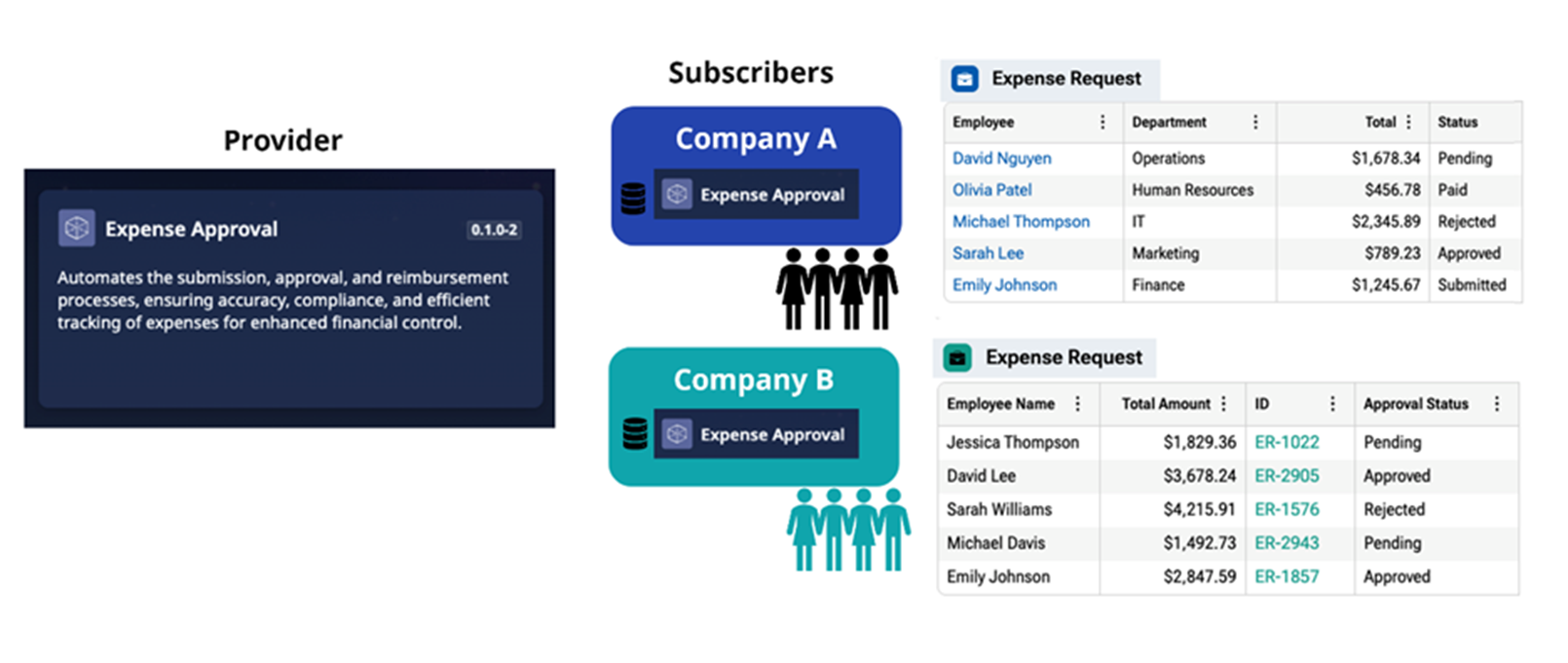
That means every customer runs on the same product version, shares the same underlying resources, and gets updates simultaneously. However, each tenant still has its own isolated space in the system, so they can’t access anyone else’s data or settings.
There are a few common multi-tenant architecture types:
- Shared database with a shared schema: The simplest option, where every record includes a tenant identifier.
- Separate schemas per tenant within the same database: This approach provides a stronger boundary without creating additional databases.
- Separate database per tenant: This model supports compliance and performance isolation but increases operational overhead.
Many real SaaS products adopt a hybrid approach, where most tenants share infrastructure, while large enterprise tenants receive dedicated storage or isolated clusters as needed.
What are the benefits of multi-tenant architecture?
Multi-tenant foundations remove repetitive infra work, so your team can focus on product features that win customers. Let’s check out its key benefits:
1. Lower costs & efficient resource use
Because all customers share the base infrastructure, the per-customer cost is much lower than if each had its own stack. This means better margins and the flexibility to compete on pricing or reinvest in product features for mid-market teams.
There’s no longer a situation where 50% of servers are reserved for one client. This shared model is economically efficient and makes SaaS more affordable for customers, too.
2. Easier maintenance & updates
In a multi-tenant SaaS, you maintain one codebase and environment. When you apply a security patch or roll out a new feature, it’s one deployment that affects all tenants at once.
There’s no need to update dozens of separate instances manually. This saves engineering time and ensures consistency. Your team can focus on improving and building features that differentiate your product.
3. Fast onboarding
Since the environment is largely identical and already running, a new customer can be added by simply creating a new tenant/account in the system.
This means a new client can sign up and start using your SaaS product almost immediately, which is great for product-led growth. It’s a one-to-many model, so scaling from 10 to 100 customers simply involves configuring more tenant accounts rather than deploying 90 additional servers.
4. Scalability & growth
With the right design, multi-tenant architectures scale naturally. If usage grows, you can scale out shared resources to benefit all tenants.
This centralized scaling is often easier to manage and more flexible than scaling multiple independent instances. Multi-tenancy is the only practical way to serve thousands of customers without an operations nightmare.
5. Network effects & faster feedback
Having all customers on a single platform can accelerate feedback loops. You can observe usage patterns across tenants and improve the product for all users.
Offering a one-size platform encourages a community, too. While not a direct technical benefit, having everyone on a single system can drive faster product-market fit iterations and, where relevant, support cross-tenant features such as benchmarking data.
What are the challenges of multi-tenancy?
Multi-tenant SaaS introduces some challenges that you must plan for. Here are key drawbacks and how to think about them:
1. Security & data isolation
With multiple customers sharing the application, there’s a greater responsibility on the software to enforce isolation. Unlike single-tenancy, a bug in multi-tenant code could accidentally expose one tenant’s data to another if not handled carefully.
2. Noisy neighbor performance issues
When resources are shared, a customer’s heavy usage could degrade performance for others. This so-called noisy neighbor effect is a common challenge in multi-tenancy.
For example, if Tenant A triggers a costly report or gets a traffic spike, overall database or CPU performance might dip for Tenant B.
3. Limited customization per tenant
Multi-tenant systems keep all tenants on the same app version, which means individual customers can’t have entirely custom software.
This is usually fine, but for clients who want heavy customization or unique release schedules, multi-tenancy can be a tough sell.
4. Compliance & data residency
If your customers operate across regions (EU, US, etc.), data residency laws may require certain data to remain within a specific region.
This can mean you need multiple instances of your multi-tenant app in different regions. This adds complexity in deployment.
5. Backup & tenant-specific recovery
In a multi-tenant model, backups are often performed at the system level rather than per tenant. This means restoring data for a single customer in a multi-tenant database can be complex.
Despite these challenges, they can be managed with good architecture and processes. In fact, many of the best practices we’ll discuss next are designed to mitigate these multi-tenancy risks.
What are the best practices for multi-tenant SaaS architecture?
Designing a multi-tenant SaaS requires proactive planning. A tenant-ready foundation built up front prevents repeated low-value rebuilds later. Here are the best practices to guide your architecture:
1. Design for strong tenant isolation
You need to make sure that each tenant’s data and activities are isolated from others at every layer. This means:
Application layer
Every request in your app should be executed in a tenant context. You should use middleware or context variables to tag each request with its owner. All business logic should respect those boundaries. For example, Tenant A cannot read Tenant B’s records.
Database layer
If using a shared database, every query must include a tenant identifier filter. Consider an ORM or query builder that automatically injects tenant filters so you don’t accidentally forget.
Some teams even structure the DB with a separate schema per tenant or use row-level security features in modern SQL databases to enforce isolation.
File storage & other services
Similar rules apply to any file storage and integrations. Multi-tenant SaaS often uses unique storage keys or segregated buckets for each tenant’s files to avoid any mix-ups.
Testing for isolation
You must include tests and security audits that attempt cross-tenant data access to ensure your controls hold up. It’s cheaper to catch a flaw in isolation logic in QA than to have a customer report seeing someone else’s data.
2. Implement robust access controls
Multi-tenancy should be treated as an authorization concern. Your app’s authorization logic should always check:
“Does user X belong to tenant Y, and are they allowed to do Z in that tenant’s context?”
You should leverage role-based access control (RBAC) to manage permissions within and across tenants. Many SaaS platforms implement an organization-level role structure: each tenant is treated as an organization, with users assigned roles within that org.
A clear org/role model speeds security reviews, shortens procurement cycles, and lowers legal risk.
3. Plan for scalability from day one
In multi-tenant SaaS, scaling issues compound if not addressed early. Design your architecture to scale horizontally rather than relying on a single large server. Use cloud services that support auto-scaling. Some tips:
- Keep your application servers stateless, so you can run many of them behind a load balancer. Tenant-specific state should be in the database or distributed cache, not in-memory on a single server.
- Consider using a caching layer, like Redis, with tenant-aware keys to reduce database load on frequently accessed data. This can improve performance at scale.
- As mentioned earlier, implement resource quotas or at least monitors. For example, if one tenant starts making 10x as many API calls as others, your system should be alerted and either throttle them or scale up capacity.
- If using a single database, plan for read replicas and, as data grows, consider sharding. If using multiple databases, have efficient methods for provisioning new ones.
- Don’t wait until you have 1000 tenants to find scaling bottlenecks. Simulate multi-tenant load in testing. This will surface issues with how you handle concurrency, resource pooling, and related areas.
By architecting with scalability in mind, you ensure your multi-tenant SaaS can grow with your customer base without constant re-engineering.
4. Leverage feature flags and configurability
Since you can’t customize code for each tenant in a multi-tenant environment, use feature flags and configuration options to introduce flexibility. Feature flags allow you to enable or disable features for specific tenants.
Beyond feature flags, you can offer self-service configurations where possible. For instance, let each tenant customize settings like notification preferences, branding, and business rules within predefined limits. This increases perceived ownership without requiring separate code.
5. Streamline tenant onboarding and lifecycle
Always think through the tenant lifecycle – onboarding, configuration, growth, and possible offboarding. A practical best practice is to automate tenant provisioning wherever possible. When a new customer signs up, or a sales deal closes:
- Your system should create a new tenant entry, set up any default data or configurations, and provision any required isolated resources.
- Provide a smooth initial setup experience. Maybe a wizard for the new tenant admin to configure basic settings, invite users, and integrate their data.
- Multi-tenant B2B apps often need to integrate with the tenant’s other systems. Make this easy through clear guides or even built-in support.
6. Prepare for regional and large-tenant needs
As your SaaS grows, you might get requests like “Can we have our data stored in our country?” or “We’re a huge customer, can we have our own instance?”
Always be ready to support hybrid approaches if needed:
- You might deploy separate instances of your app across different regions to meet data residency requirements. Design your DevOps to make deploying a new copy of your stack easy.
- In some cases, offering a single-tenant deployment to a large enterprise may be a good business decision. If you foresee this, build modularly so you can extract a tenant’s data and configuration and deploy it standalone if absolutely necessary.
7. Monitor and audit everything
With many tenants in a system, visibility is key. You want to know:
- Usage per tenant
- Performance per tenant
- Errors per tenant
It’s good practice to have an audit trail of important actions. Who did what, and in which tenant context? This not only helps with compliance but also with debugging when a customer says, “Hey, data X is missing.” You can check if someone in their organization deleted it.
How to plan your multi-tenant SaaS step by step
Now that we’ve covered the concepts and best practices, let’s outline a practical execution plan. Here are the key steps and considerations:
Step 1: identify requirements & constraints
Start with understanding your customers.
- Do they have strict data isolation or compliance needs?
- How much data will each tenant generate?
- What level of customization do they expect?
Step 2: choose a tenancy model
Decide between shared everything, database-per-tenant, or a hybrid model. If unsure, design for the simplest model that meets current needs while remaining flexible. This protects future deals without slowing initial launches.
For example, you might start with a shared database and structure your code to support multiple databases later.
Step 3: implement tenant context early
From the first line of code, make sure you include tenant awareness. This could mean setting up an Organization or Tenant model in your system and ensuring every user account is linked to one.
Require an “org_id” in all major tables. It’s much harder to bolt this on later, so do it upfront.
Step 4: secure the walls
Prioritize security design. Set up proper authentication, then enforce authorization rules to segregate tenant data.
Consider penetration testing or code audits focused on cross-tenant access. One lapse in this area can be catastrophic for a SaaS business’s reputation, so it’s worth the investment.
Step 5: design the data schema for growth
If using a single schema for all tenants, it should be able to handle adding more tenants without performance hits. If using multiple schemas/DBs, plan how you’ll manage migrations. Always factor in how you’ll handle very large tenants.
Step 6: automate provisioning & DevOps
Write scripts or use infrastructure-as-code to automate tenant setup. For example, if each tenant has a schema, a script can create it and apply migrations in a single step.
If you need new DNS subdomains or per-tenant certificates, automate their provisioning in your CI/CD pipeline. The less manual work you have, the more smoothly you can scale customer onboarding.
Step 7: test with multiple tenant scenarios
Set up multiple test tenants and ensure all features work in parallel without bleeding. Test user roles within tenants, as well. It’s helpful to have seed data for multiple tenants in development to catch issues early.
Step 8: monitor & iterate
As you launch and onboard real customers, watch how the multi-tenant system behaves. Use the monitoring and audit approaches discussed to gather data.
You may find that certain queries are resource-intensive and need caching, or that a feature is used heavily by one tenant but not others. Be ready to tweak resource allocations or refactor components as you learn usage patterns.
Step 9: have a scalability game plan
Even if you don’t need it on day 1, know what you’ll do when you 10x your tenant count or data size.
Will you share the database or spin up a secondary app cluster?
Having a rough plan means when growth hits, you’ll respond proactively. A lot of this comes down to using proven, scalable tech stacks.
Also consider leveraging existing platforms or frameworks for common needs. Speaking of leveraging platforms, we turn to Launchpad. If your goal is to build an enterprise-grade SaaS quickly without worrying about the underlying tenant infrastructure, Launchpad might be exactly what you need.
Why is Launchpad the best ready-made foundation for multi-tenant SaaS?
Building multi-tenant architecture from scratch can be complex, but you don’t have to do it all alone. Launchpad is an AI-native, fully managed platform designed to give B2B SaaS products an enterprise-grade foundation out of the box.
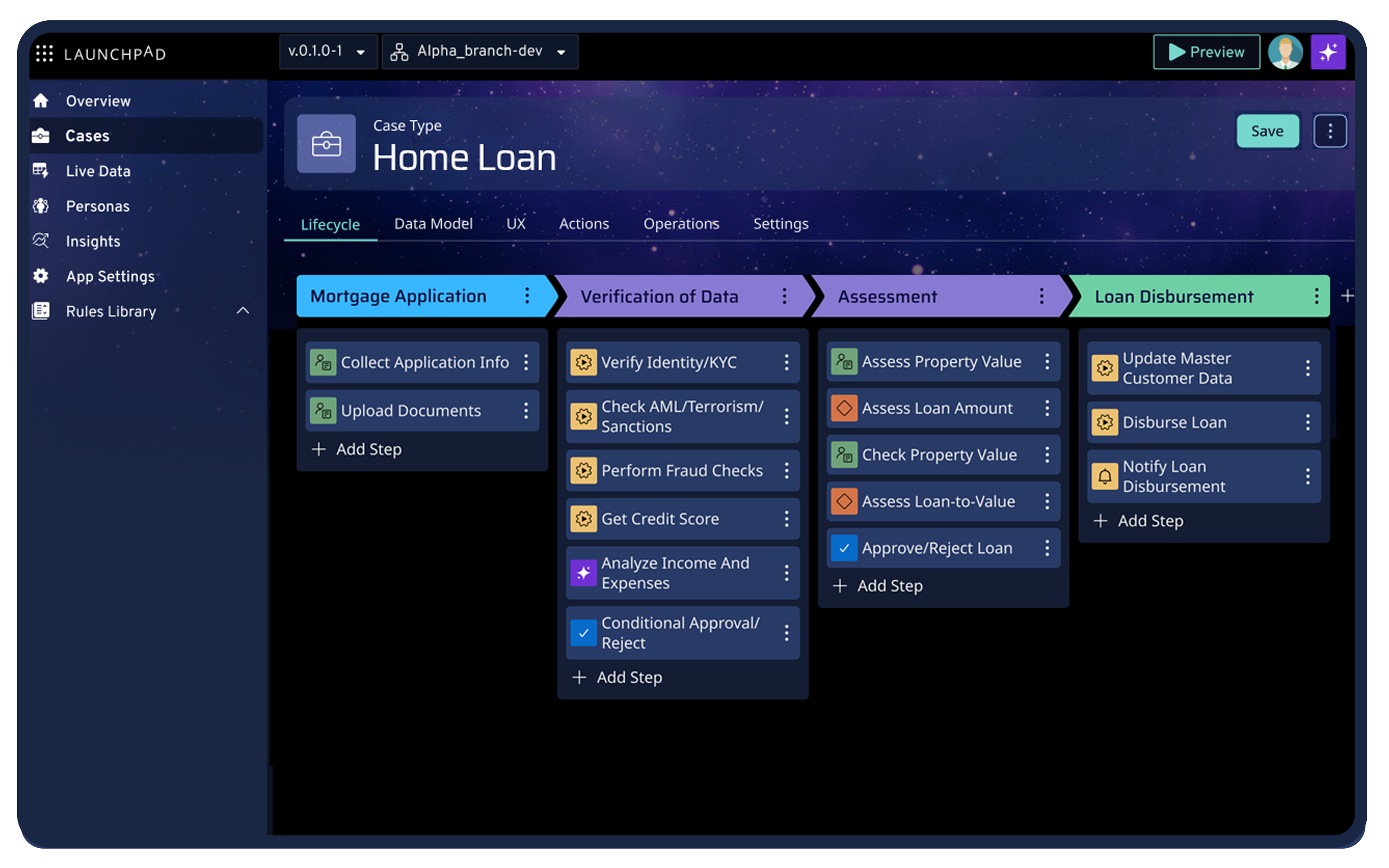
Here’s how Launchpad positions itself as the best option for modern SaaS builders:
1. Built-in multitenancy & security
Launchpad provides a production-ready, multitenant, secure-by-design cloud infrastructure. The platform comes with data isolation, tenant management, and compliance features.
You don’t have to architect the database sharding or tenant context. This means from day one, your app can be enterprise-grade in terms of security and reliability.
2. Infrastructure abstraction
With Launchpad, you deploy your SaaS on a fully managed runtime. You won’t be dealing with DevOps, cloud configurations, or scaling servers.
This service-as-an-infrastructure approach lets you focus on building IP. Launchpad’s managed environment provides scalability and uptime.
3. Agentic workflows & automation
Launchpad is AI-powered with robust workflow orchestration capabilities built in. You can design agentic workflows using its enterprise-ready tools.
For a SaaS product, this means you can offer advanced automation features to your tenants without developing that core engine from scratch.
4. Subscriber management & usage-based pricing
Out of the box, Launchpad includes subscriber management features. It’s designed to support usage-based pricing models through its Launchpad Unit system. This is huge for modern SaaS, as many are moving from seat-based pricing to usage or outcome-based pricing.
Metering and usage-based billing are built in, so you can monetize in flexible ways without building a custom billing engine.
5. Compliance & enterprise-grade capabilities
Launchpad was designed with enterprise needs in mind. So things like audit logs, compliance standards, data encryption, and governance are available out of the gate.
If your SaaS targets fintech, healthcare, or other regulated sectors, this can save you countless hours of retrofitting security and compliance features.
6. No-code development speed
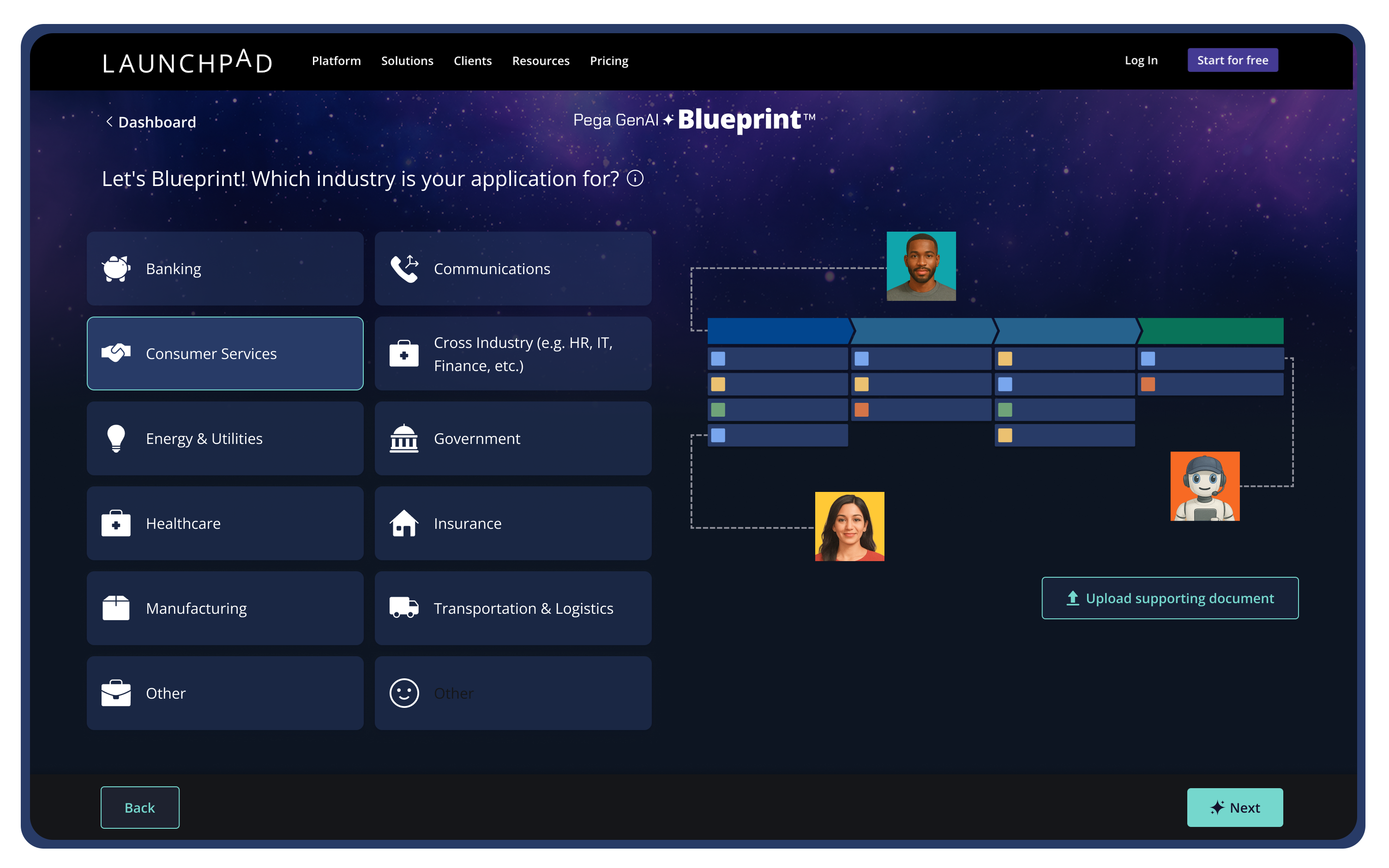
The platform uses a no-code development model to build your app’s features. This means you can assemble UI, workflows, and data models using high-level tools powered by GenAI to accelerate development from idea to app.
Launchpad’s philosophy is to enable companies to build custom products faster by automating much of the undifferentiated work.
For product leaders evaluating build vs buy, Launchpad makes a compelling case.
FAQs
1. What is multi-tenant SaaS architecture?
It’s a software architecture where a single application instance serves multiple customer organizations simultaneously, keeping each tenant’s data isolated while sharing the underlying infrastructure.
2. What are the benefits of multi-tenant architecture for a SaaS product?
The key benefits include lower per-customer costs, easier, unified updates, and better scalability by pooling resources across all tenants. It also simplifies onboarding new customers.
3. How do I ensure data security in a multi-tenant architecture?
- Architect for tenant isolation at every level.
- Use unique tenant IDs for all data and enforce that in every query and API call.
- Implement strict access controls so users can only access their organization’s data.
- Encrypt data in transit and at rest per tenant.
- Regularly audit your code and logs to ensure there are no cross-tenant data leaks.
4. Can I start with a single-tenant model and move to multi-tenant later?
Yes, but it’s quite difficult to retrofit multi-tenancy later. It usually requires significant refactoring. New SaaS projects should start with a multi-tenant design in mind, even if initially you onboard only one customer.
5. What is an example of a multi-tenant SaaS application?
Salesforce is a classic example. Other examples include Slack, Shopify, or Office 365.
6. How can Launchpad support multi-tenant SaaS architectures?
Launchpad provides an AI-native, multi-tenant SaaS platform that handles the heavy lifting for you. It offers built-in multi-tenant cloud infrastructure, security, compliance, user management, and even workflow automation. It provides a ready-made, enterprise-grade foundation, so you don’t need to build multitenancy from scratch.
About the Author
Jason Masciarelli (VP, Launchpad Go-To-Market & Ventures) helps companies build new revenue streams by bringing powerful SaaS apps to market and leads the strategic investment into early-stage companies to accelerate growth and innovation.