

This article is part of the Launchpad Agent Skills series.
1. Introduction
Modern digital government initiatives demand applications that are simple for citizens yet powerful under the hood. Citizens should be able to report civic issues (such as road damage, waste management, or streetlight outages) without navigating multiple systems or learning new portals.
While working on a SmartCity Civic Services application, our goal was clear:
Use Launchpad for robust case management and workflows, while keeping a native React-based government portal as the frontend.
This blog narrates my experience of achieving that goal using Launchpad DX APIs, and how Public DX API Agent Skills dramatically simplified the journey.
2. The business context: SmartCity civic service fulfillment
The SmartCity application was designed around a Civic Service Fulfillment workflow built in Launchpad, leveraging its strengths in case management.
The workflow consisted of well-defined stages:
- Intake – Capture citizen request
- Assessment – Validate and classify the issue
- Fulfillment – Assign and execute the required service
- Resolution & Close – Complete and close the request
From the citizen’s point of view, however, this entire workflow should be invisible.
Citizens should raise and track civic service requests directly from the government portal, without logging into Launchpad or switching systems.
This made Launchpad a backend system of record, not a user-facing UI.
3. The challenge: native React portal meets Launchpad
The government portal was already being developed using native React. Embedding Launchpad UI or building a custom Constellation-based frontend was not an option.
That left us with a key architectural question:
How do we integrate a native React application with Launchpad’s case management capabilities?
I knew Launchpad exposed DX APIs, but initially I wasn’t sure:
- Which DX API endpoints were relevant
- How OAuth authentication worked end-to-end
- How to handle real-world flows like “create citizen only if they don’t already exist”
- How to display case status back in the portal efficiently
Exploring multiple documentation pages and reverse‑engineering API behavior would have worked, but it would have slowed down delivery significantly.
4. Discovering the DX API public Agent Skill
The turning point came when I discovered the DX API Public Agent Skill, available through the public Launchpad GitHub repository by installing it with:
npx skills add https://github.com/pegasystems/pega-launchpad-agent-skills --skill launchpad-dx-apis
By installing the skill directly into VS Code, I gained:
- A curated understanding of DX API concepts
- Clear explanation of OAuth client credentials flow
- Swagger‑like visibility into DX API endpoints supported by Launchpad
- Step‑by‑step guidance tailored to real integration use cases
Instead of searching for information, I was now guided through the integration.
The skill didn’t replace documentation; it accelerated comprehension and execution.
5. The ultimate solution: end‑to‑end integration flow
The SmartCity integration ultimately followed a clean, predictable DX API flow.
High‑level steps
- Citizen submits a civic service request in the government portal
- Portal queries Launchpad to check whether a Citizen Profile exists
- If not found, the portal creates a Citizen data object
- Portal creates a Civic Service Fulfillment case by passing Citizen ID along with service fulfillment data.
- Launchpad routes the case to a Service Agent for further processing.
- Citizen tracks request status through the government portal using DX Data Views
6. Architecture & flow diagram
The following diagram illustrates how the SmartCity application interacts with Launchpad using DX APIs, while Launchpad handles workflow orchestration internally.
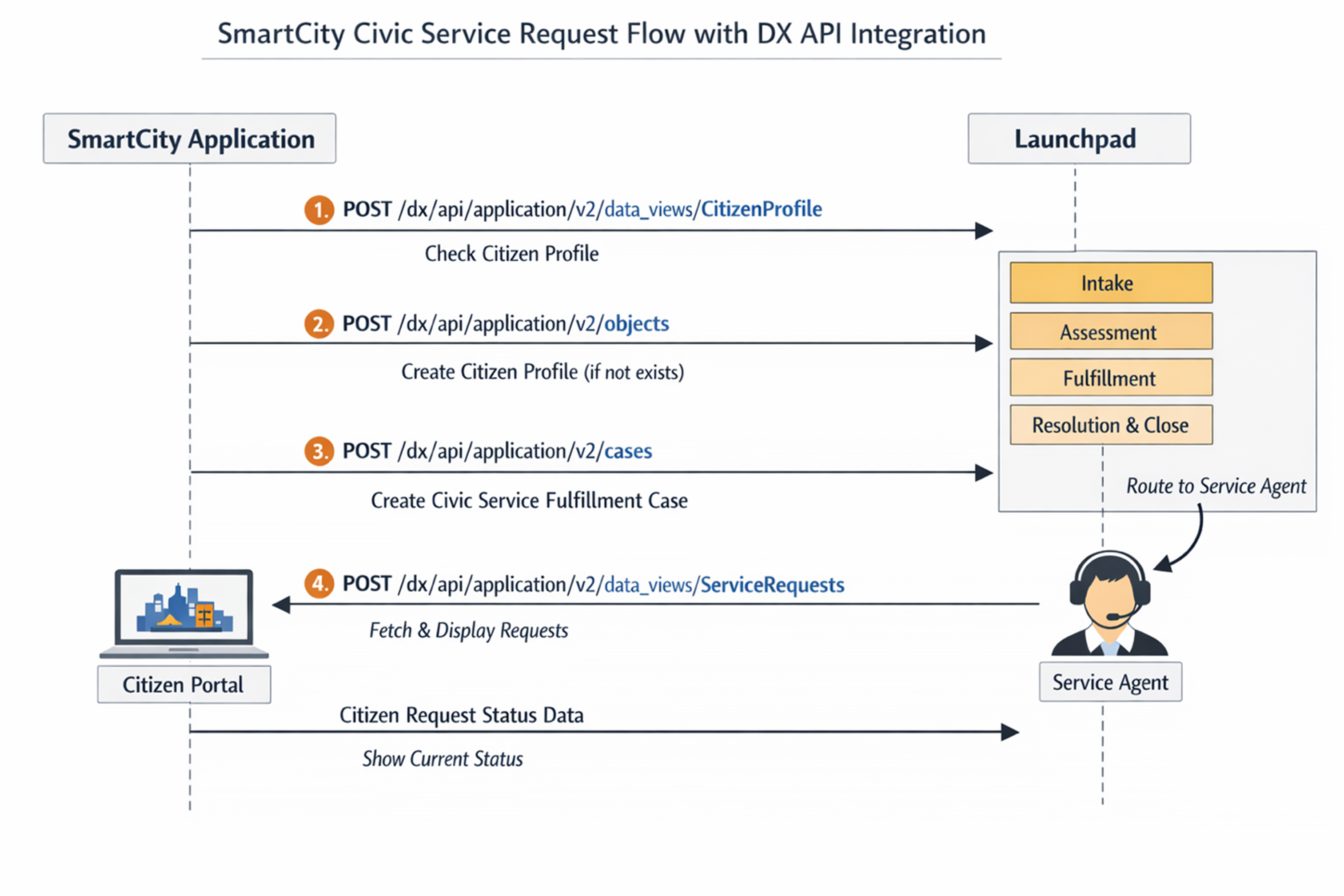
Above: SmartCity civic service request flow with DX API integration
What this diagram highlights:
- Launchpad operates as a headless workflow engine
- DX APIs act as the integration contract between frontend and backend
- Citizens never interact with Launchpad UI directly
- Service Agents work inside Launchpad to resolve cases
7. DX API endpoints used (simplified view)
Below are the key DX API calls used in this integration.
Create a Citizen Data Object (if not exists)
|
POST /dx/api/application/v2/objects
{ "objectTypeID": "<DataTypeName>", "content": { "... citizen fields ..." } } |
Query Data Views (Citizen Profile / Request List)
|
POST /dx/api/application/v2/data_views/<DataViewName>
{ "dataViewParameters": { "... parameters ..." }, "query": { "select": [ { "field": "FieldName" } ] } } |
✅ Data View names are configured in the Operations tab of the case type in Launchpad.
Create Civic Service Fulfillment Case
|
POST /dx/api/application/v2/cases
{ "caseTypeID": "<CaseTypeName>", "content": { "... allowed fields ..." } } |
✅ Only fields marked as Allowed Fields on the case type can be passed.
8. What made this approach successful
Several factors contributed to the smooth integration:
- Launchpad DX APIs provided a stable, model‑driven backend
- Case lifecycle logic remained fully inside Launchpad
- Native React UI retained full control over citizen experience
- Public DX API Agent Skill removed guesswork and false starts
Most importantly, integration became predictable and repeatable.
9. Lessons learned
1. Treat Launchpad as a backend platform
Launchpad works exceptionally well as a workflow and case management backend, even when no Launchpad UI is exposed to end users.
2. DX APIs are the right integration layer
DX APIs are not just “technical endpoints”; they reflect Launchpad’s case model, data model, and lifecycle, making integrations robust and future‑proof.
3. Data views are powerful for UI rendering
Using DX Data Views to fetch citizen requests and case status made it easy to:
- Render dashboards
- Filter and paginate data
- Keep frontend logic lightweight
4. Agent Skills reduce ramp‑up time dramatically
The DX API Public Agent Skill acted as a fast‑lane:
- Reduced exploration time
- Explained best practices implicitly
- Helped move from concept to working integration quickly
5. Separate systems can still feel unified
With the right API design, citizens feel like they’re using one system, even when:
- Frontend is a React app
- Backend is Launchpad
- Workflow is handled by service agents internally
10. Conclusion
This SmartCity use case proved that Launchpad DX APIs enable clean separation of concerns:
- Frontend teams focus on citizen experience
- Launchpad manages workflows, data, and governance
- DX APIs bridge the two seamlessly
If your goal is to use Launchpad as a headless, enterprise-grade workflow backend, starting with the DX API Public Agent Skill is the shortest and safest path forward.
About the Author
As a Senior Solutions Architect for Launchpad Provider Success, Pradeep brings his passion for solution design & architecture to Launchpad, providing product excellence that helps fuel the journeys of clients/providers.